CargoSoft API (2026.1)
Attention: Since our API is still under development, endpoints may well change, or object structures may change. Of course, we try to avoid this as much as possible, but we cannot guarantee it. So that you have the possibility to react in time, we will soon offer you a possibility to subscribe to a newsletter. We would then inform all subscribers when something will change in the API. We are currently still looking for an integrable solution for newsletters, which can be used to subscribe and unsubscribe at this place. Until then, we would like to ask you to send us an email to support@cargosoft.de with the request that we inform you when there are planned changes to the API.
Please note: The API endpoints available to a customer depend on the installed CargoSoft version. New endpoints must be enabled by CargoSoft before they can be used.
This page documents all business-relevant changes to our API.
| Category | Endpoint / Area | Change | Impact and required action | Version |
|---|---|---|---|---|
| Added | POST /cargosoft/shipment | Added new shipment create endpoint. | No changes to existing integrations are required. | 2026.1 |
| Added | Use cases | Added new use case to create a shipment - see. | No changes to existing integrations are required. | 2026.1 |
| Added | E-File | Added support for E-File - see. | No changes to existing integrations are required. | 2026.1 |
| Added | Provider status | Added POST /cargosoft/status to create a provider status - see. | No changes to existing integrations are required. | 2026.1 |
| Added | Basic data | Added new edi code conversion endpoints. | No changes to existing integrations are required. | 2026.1 |
| Deprecated | ShipmentEventQualifier | The shipment event qualifer TRANSSHIPMENT is now deprecated and will be removed in a future version. | Use the TRANSSHIPMENT_ARRIVAL shipment event qualifer instead. | 2026.1 |
| Category | Meaning |
|---|---|
| Breaking change | A non-backward-compatible change that may require integration updates |
| Added | A new feature, endpoint, field, or supported value |
| Changed | A backward-compatible change to existing behavior |
| Deprecated | A feature is still available but will be removed in the future |
| Removed | A feature, endpoint, or field has been removed |
| Fixed | A bug fix without an intended breaking interface change |
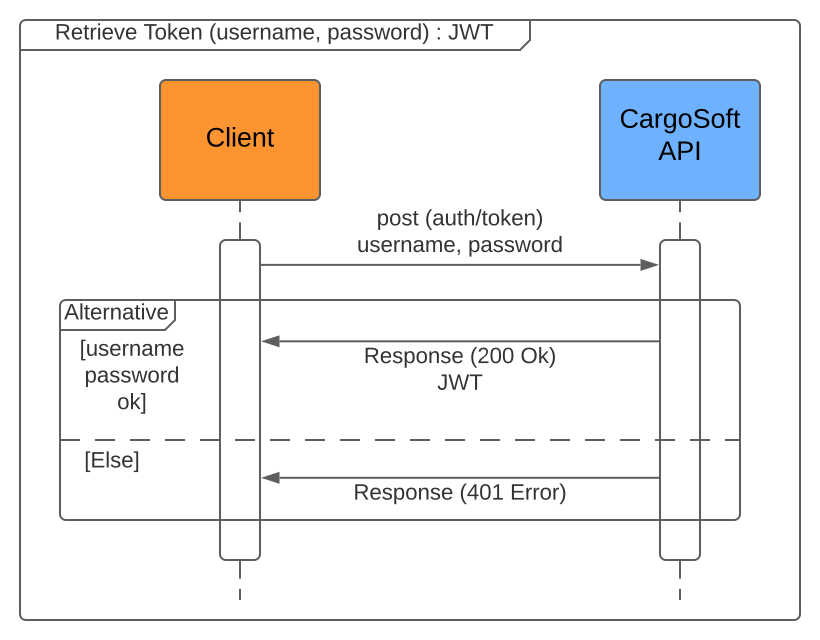
First of all each client has to request a bearer Java Web Toke (JWT) from the CargoSoft API. To receive a JWT, username and password are required. Username and password can only be created by CargoSoft. For more details see.
Please note: The JWT is valid for 24 hours. After that you have to request a new one.
To access the CargoSoft API endpoint, a JWT is required. The JWT has to be sent in the HTTP authorization header.
Example: This example shows a minimal curl with a bearer authorization header. The token is not valid because we only want to illustrate the structure.
curl --location --request POST 'https://api-demo.cargosoft.de/cargosoft/shipment/lookup' \
--header 'Authorization: Bearer eyJ0eXAiOiJqd3QiLCJhbGciOiJSUzI1NiJ9.eyJzdWIiOiJ1cGRhdGUiLCJjYXJnb3NvZnQtand0LNjc2NDQ1NTAzfQ.mK82rjSu0ltd0bf3mvXUqwpME05ck5OEuqnzsAQ8WPFPo' \
--data-raw '[]'"
Attention: Your user may be restricted. The CargoSoft API uses a permission system to grant access to the CargoSoft API endpoint. If your user is restricted or it's not allowed to use an endpoint you need please contact our support.
The webhook uses basic auth as its authorization type.
Example: This example shows a minimal curl request, to access the webhook. The basic auth is not valid.
curl --location --request POST 'https://api-demo.cargosoft.de/external/webhook' \
--header 'Authorization: Basic cG9ydg53xcvgawawb3J0YmFzZWNj' \
--data-raw '{}'"
Please note: Your user needs a special role to access the webhook endpoint via basic auth.
The CargoSoft API extends the CRUD retrieve operations with lookup operations. Each functional group of endpoints should have a lookup method implemented. Lookups should be used to search functional objects with given criteria named identifiers. The identifiers may be different to each functional group. To find out which functional identifier are possible, please take a look at the corresponding functional group.
The identifier will be sent in the request body to the API lookup endpoint. An identifier contains the following three information:
- match_mode: The match mode can alter the behaviour, how the criteria is compared against the object in the database are [EQUALS, CONTAINS, IN, OR, GT, LT, GE, LE].
- key: The key of the criteria for the functional object to lookup. To find out which keys are possible, please check the corresponding implementation.
- value: The value of the criteria.
Example: Lookup request body to search a shipment
[
  {
    "match_mode": "EQUALS",
    "key": "MBL",
    "value": "MASTER_12345"
  },
  {
    "match_mode": "EQUALS",
    "key": "MODE_OF_TRANSPORT",
    "value": "SEA"
  }
]
Please note: When using one of any lookup methods, please define search criteria as precisely as possible to limit the result of objects.
The lookup may contain ordering by one or more criteria. The ordering will passed as a query parameter.
The result set of a lookup includes zero up to n functional objects depending on the search criteria. Each functional object contains an ID. The ID can be used to retrieve additional information by passing the id as a path parameter of the retrieve endpoint.
Example: Lookup a shipment and retrieve all shipment events
Most endpoints of the CargoSoft API use pagination mechanics.
The pagination information will be sent as a request query parameter to the API endpoint. The pagination contains the following two query parameter:
- page_no: The current number of the page
- page_size: The size of the page
Example: Lookup a shipment with pagination query parameter
curl --location --request POST 'https://api-demo.cargosoft.de/cargosoft/shipment/lookup?page_no=1&page_size=5' \
--header 'Authorization: Bearer eyJ0eXAiOiJqd3QiLCJhbGciOiJSUzI1NiJ9.eyJzdWIiOiJ1cGRhdGUiLCJjYXJnb3NvZnQtand0LNjc2NDQ1NTAzfQ.mK82rjSu0ltd0bf3mvXUqwpME05ck5OEuqnzsAQ8WPFPo' \
--header 'Content-Type: application/json' \
--data '[
    {
        "match_mode": "EQUALS",
        "key": "MBL",
        "value": "MASTER_12345"
    },
   {
        "match_mode": "EQUALS",
        "key": "MODE_OF_TRANSPORT",
        "value": "SEA"
    }
]'
The response contains two additional headers:
- X-Page-Count: The total number of pages.
- X-Row-Count: The total number of found objects.
With these both headers it is possible to scroll through a result set.
For testing purposes CargoSoft hosted a server with the last released CargoSoft API.
URL: https://api-demo.cargosoft.de
To use the test environment, please use the "Try it" console in this documentation. Login credentials are needed to use the test API. The credentials have to be requested from the CargoSoft support. The received information grants access to a test account which should be able to use all endpoints. If any endpoint is restricted, please contact CargoSoft. Please have in mind that the test environment will be reset every night!
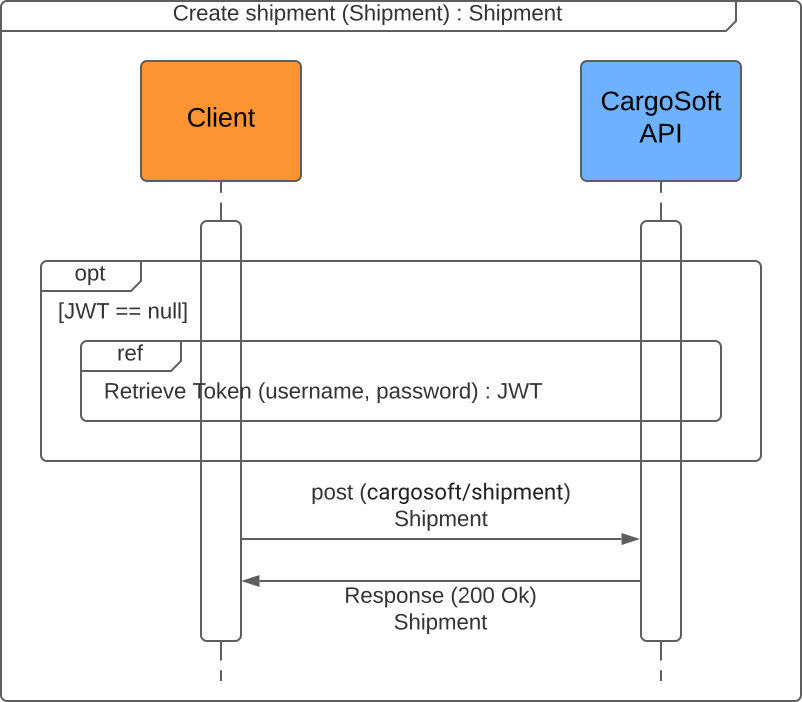
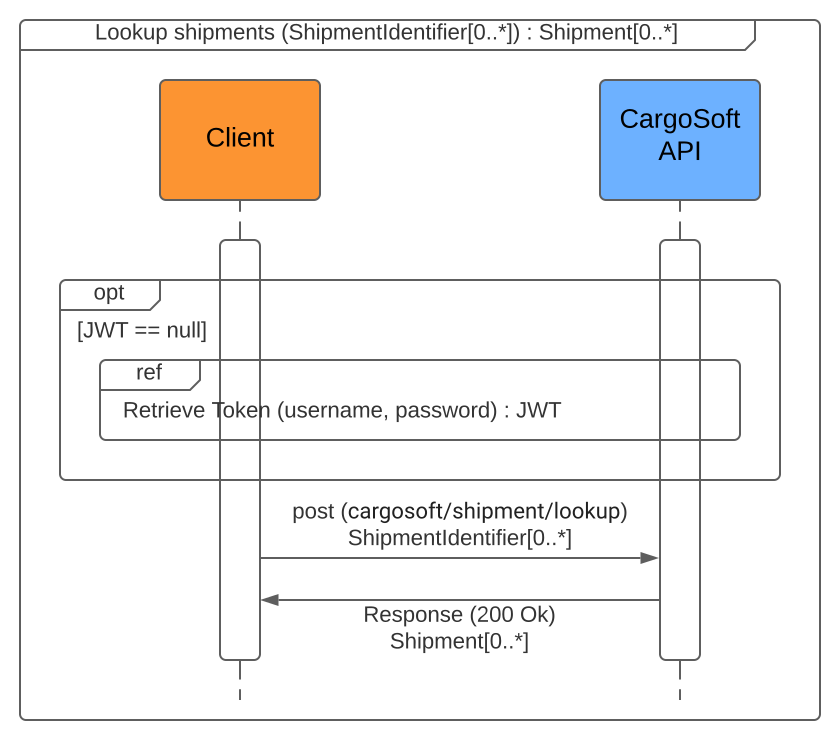
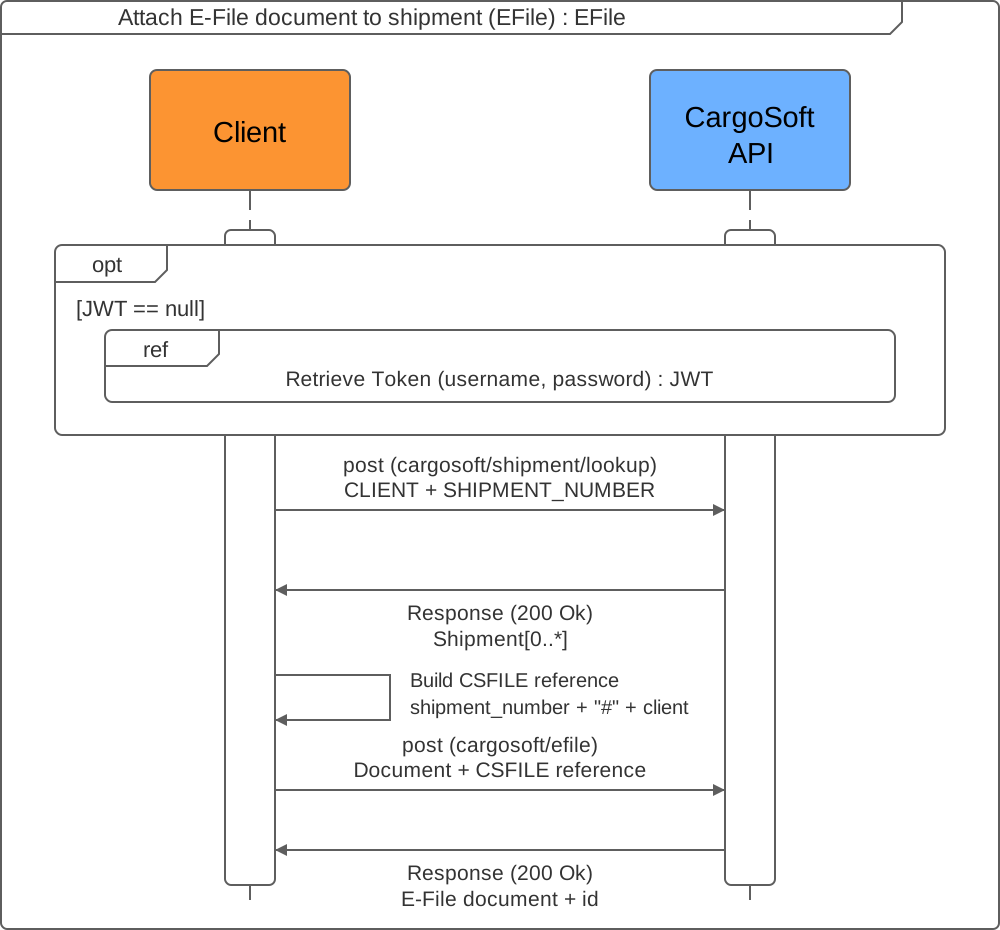
The following use cases describe common integration workflows. Every request requires a JWT in the Authorization: Bearer <token> header. For details about retrieving and using a token, see Authorization. The sequence diagrams show token retrieval as a referenced flow.
| Goal | Primary endpoint | Result |
|---|---|---|
| Create a shipment | POST /cargosoft/shipment | A new shipment with its unique ID and CargoSoft shipment number |
| Retrieve a shipment | POST /cargosoft/shipment/lookup | Matching shipments and their IDs |
| Attach an E-File document | POST /cargosoft/efile | A stored document linked to an existing shipment |
| Attach a status | POST /cargosoft/status | A provider status associated with an existing shipment |
| Retrieve shipment events | GET /cargosoft/shipment/{id}/events | The available CargoSoft events for a shipment |
Goal
Create a shipment together with any supplied nested data, such as goods, containers, addon field values, or memo lines.
Endpoint
Prerequisites
- The authenticated API username must match the matchcode of an EDI partner.
- The shipment number definition, main department, and sub department must be resolvable from the EDI partner settings or the request body.
Sequence
Workflow
- Based on the authenticated API user, the CargoSoft API determines the EDI partner to associate with the new shipment: the EDI partner's matchcode has to be identical to the API username. If no EDI partner exists for the API user, the request is rejected and no shipment is created.
- The determined EDI partner's settings are used, where configured, to fill in values that are required to generate the shipment number. See EDI partner settings for the exact keys and fallback rules.
- The shipment is created together with any nested data supplied in the same request body - goods, containers, addon field values, order memo lines, and so on. A memo text longer than the maximum line length is automatically wrapped across several consecutive memo lines. Use
POST /cargosoft/shipment/memo/lookupto retrieve memo lines independently afterwards. - If the request and all nested data pass validation, the CargoSoft API stores and returns the shipment.
Result
The response contains the created shipment, including its unique shipment ID and CargoSoft shipment number.
Error handling
- If no EDI partner matches the API username, the request is rejected and no shipment is created.
- If required shipment numbering values cannot be resolved, the request is rejected.
- If nested data fails validation, the complete shipment creation is rejected and nothing is created.
Goal
Find an existing shipment from business identifiers and obtain the unique shipment ID used by subsequent endpoints.
Endpoint
Use POST /cargosoft/shipment/lookup.
Prerequisites
- Select identifiers that narrow the result to the intended shipment.
- Use pagination when a lookup can return more results than fit on one page.
Sequence
Workflow
- Build the request body from supported shipment identifiers, such as client and shipment number.
- Call
POST /cargosoft/shipment/lookupwith the identifiers and, if necessary, pagination parameters. - Verify that the expected shipment was returned and extract its unique
id. - If full shipment details are required, call
GET /cargosoft/shipment/{id}with the extracted ID.
Result
The lookup returns zero or more base shipments. Each returned shipment contains the unique ID required for related data, such as shipment events or E-File lookups.
Error handling
- Refine the identifiers when the lookup returns no result or more shipments than expected.
- Do not select an arbitrary result when the criteria are not unique.
Development notice: The endpoint used in this workflow is still under development and may change.
Goal
Create an E-File document and link it to an existing shipment in the same request.
Endpoints
- Use
POST /cargosoft/shipment/lookupto resolve the shipment number, client, and unique shipment ID. - Use
POST /cargosoft/efileto create and link the document. - Use
POST /cargosoft/efile/{id}/referenceonly when linking an already existing document later.
Prerequisites
- The API user must be allowed to call the required shipment and E-File endpoints.
- E-File must be enabled and configured for the shipment's CargoSoft client.
- The document content must be Base64 encoded without a data-URI prefix.
- The document category must exist in the customer's CargoSoft basic data. It is mandatory when the configured E-File system uses D3 mode.
Sequence
Workflow
- Look up the shipment with criteria that identify exactly one shipment. A CargoSoft shipment number is unique only in combination with its client, so both identifiers should be supplied:
[
  {
    "match_mode": "EQUALS",
    "key": "CLIENT",
    "value": "001"
  },
  {
    "match_mode": "EQUALS",
    "key": "SHIPMENT_NUMBER",
    "value": "022120300004"
  }
]- Process the lookup response before uploading. Continue only when the expected shipment was returned, and read its
id,shipment_number, andclient. The numeric shipmentidcan later be used to look up E-File documents, but it is not the value of theCSFILEreference. - Build the shipment reference and include it in the upload request:
| Situation | Endpoint | reference_type | reference_value |
|---|---|---|---|
| Create and link a new document | POST /cargosoft/efile | CSFILE | <shipment_number>#<client> |
| Link an existing document later | POST /cargosoft/efile/{id}/reference | CSFILE | <shipment_number>#<client> |
For the lookup response above, the reference value is 022120300004#001.
- Upload the document. The following example omits optional roles; when roles are supplied, use values configured for the customer's E-File system.
document_categoryis also customer-specific.
{
  "client": "001",
  "document_category": 1601,
  "document_name": "shipping-instructions.pdf",
  "description": "Shipping instructions received from the customer",
  "document_date": "2026-11-02T10:15:00",
  "bytes": "JVBERi0xLjQKJcTl8uXr...",
  "references": [
    {
      "reference_type": "CSFILE",
      "reference_value": "022120300004#001"
    }
  ]
}- Keep the returned E-File document ID when references or roles need to be managed later.
Result
The response contains the stored E-File document and its unique id. The included CSFILE reference links the document to the resolved shipment.
Error handling and retries
- A shipment lookup that returns no result or more than the expected shipment must be resolved before the upload. Refine the lookup identifiers instead of choosing an arbitrary result.
401or403indicates missing or insufficient API credentials. Do not retry until the credentials or endpoint permissions have been corrected.- Invalid Base64 data, an unknown client, a missing mandatory document category, or an unavailable E-File system causes the upload to fail. The error response must be handled before another upload is attempted.
- The server-side connection from the CargoSoft API to the configured E-File system has a default timeout of 30 seconds; the deployment can override this value. API consumers should configure their HTTP timeout with enough headroom for that downstream call.
- The CargoSoft API does not automatically retry a failed upload.
POST /cargosoft/efileis not idempotent, so a blind retry after a client or downstream timeout can create a duplicate. First call the E-File lookup with the shipmentidasSHIPMENT_IDand verify whether the document was stored. Retry only when it is absent. If a503response containsRetry-After, wait for the stated interval before retrying.
Development notice: The endpoint used in this workflow is still under development and may change.
Goal
Create a provider status and associate it with an existing shipment through its CargoSoft client and shipment number.
Endpoints
- Use
POST /cargosoft/shipment/lookupto identify the shipment and confirm its client and shipment number. - Use
POST /cargosoft/statusto create the provider status.
Prerequisites
- The API user must be allowed to call both the shipment lookup and provider status endpoints.
- The endpoints must be available for the installed CargoSoft version and enabled by CargoSoft.
- The provider and provider status must be configured in the customer's CargoSoft master data.
- The customer-specific client, provider, and provider status codes must be known.
Sequence
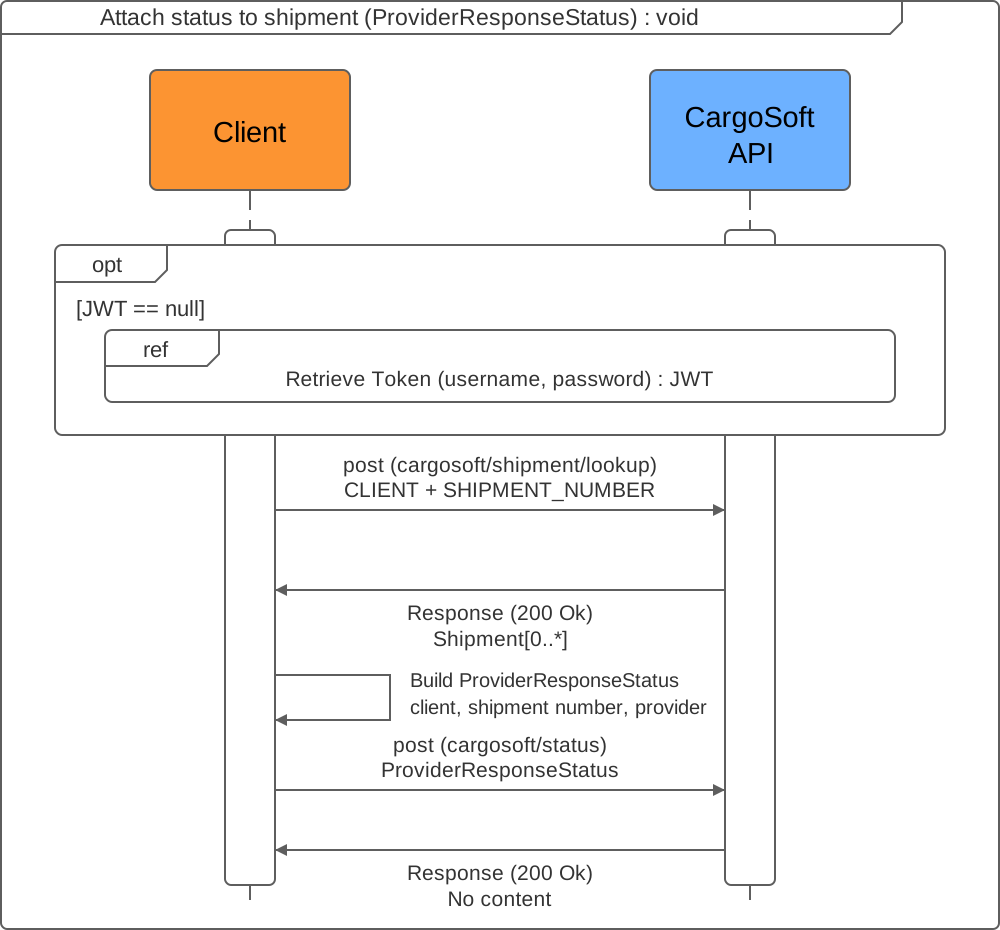
Workflow
- Look up the shipment with criteria that identify exactly one shipment. A CargoSoft shipment number is unique only in combination with its client, so both identifiers should be supplied with exact matching:
[
  {
    "match_mode": "EQUALS",
    "key": "CLIENT",
    "value": "001"
  },
  {
    "match_mode": "EQUALS",
    "key": "SHIPMENT_NUMBER",
    "value": "022120300004"
  }
]- Continue only when the expected shipment was returned. Read its
clientandshipment_number; the numeric shipmentidis not used by the provider status endpoint. - Build the provider status request.
CLIENTandPROVIDERare required for status processing, whileSHIPMENT_NUMBERassociates the status with the resolved shipment. The values below are examples and must be replaced with codes configured for the customer:
{
  "provider_status": "EXPECTED_ARRIVAL",
  "status_date_and_time": {
    "date": "2026-11-02",
    "time": "10:15:00",
    "zone_offset": "+01:00"
  },
  "additional_information": "Estimated arrival updated by customer integration",
  "unique_provider_message_number": "STATUS-2026-000123",
  "status_events": [
    {
      "type": "STATUS",
      "date_and_time": {
        "date": "2026-11-04",
        "time": "08:30:00",
        "zone_offset": "+01:00"
      },
      "event_date_type": "ESTIMATED"
    }
  ],
  "references": [
    {
      "type": "CLIENT",
      "reference": "001"
    },
    {
      "type": "SHIPMENT_NUMBER",
      "reference": "022120300004"
    },
    {
      "type": "PROVIDER",
      "reference": "CUSTOMER_API"
    }
  ],
  "identifiers": []
}- Send the request to
POST /cargosoft/status. Copy the client and shipment number from the verified lookup result without changing their formatting.
Result
A successful request returns 200 OK without a response body. CargoSoft creates the provider status and associates it with the shipment when the supplied references resolve it. Depending on the configured master-data mapping, the provider status can also create a customer-defined shipment status or update shipment event data.
Error handling and retries
- Stop when the shipment lookup returns no result or more than the expected shipment. Refine the lookup criteria instead of choosing an arbitrary result.
- A missing
CLIENTorPROVIDERreference, an unknown client, or a provider status that is not configured for the provider causes status processing to fail. Correct the request or master data before retrying. 401or403indicates missing or insufficient API credentials. Do not retry until the credentials or endpoint permissions have been corrected.- The endpoint has no automatic retry mechanism. Client, proxy, and deployment timeouts apply to the request.
POST /cargosoft/statusis not idempotent. A blind retry after an ambiguous timeout can create a duplicate provider status.unique_provider_message_numberis stored for traceability but is not an idempotency key. Because no provider status retrieval endpoint is available, verify the result in CargoSoft before retrying.
Goal
Retrieve the CargoSoft-defined events currently available for an existing shipment.
Endpoint
Prerequisites
The unique shipment ID must be known. If only business identifiers are available, first follow the Retrieve a shipment workflow.
Sequence
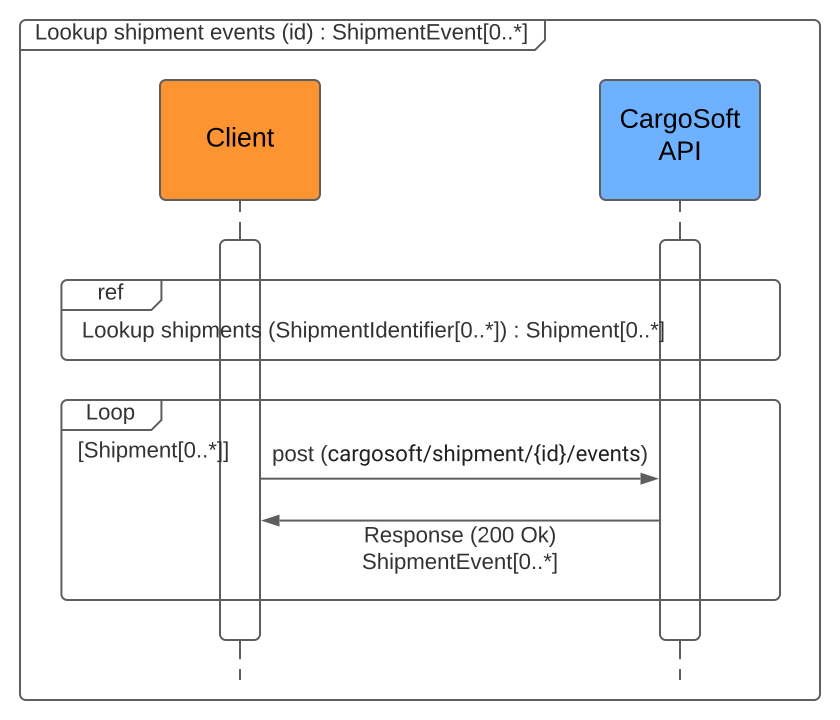
Workflow
- Resolve the shipment with
POST /cargosoft/shipment/lookupwhen its unique ID is not yet known. - Extract the shipment
idfrom the lookup result. - Call
GET /cargosoft/shipment/{id}/eventswith that ID.
Result
The response contains the available CargoSoft shipment events. An event represents either a planned or an actual instance. For the differences between provider status, customer-defined shipment status, and shipment events, see Shipment status model.
Error handling
- The response may not contain every possible event because some events may not have been recorded for the shipment yet.
- Verify the shipment ID when no events are returned unexpectedly.
This section contains background information and configuration rules used by the workflows above. It does not describe additional API workflows.
CargoSoft stores status information in different pools. The following diagram shows how status messages can be mapped and processed.
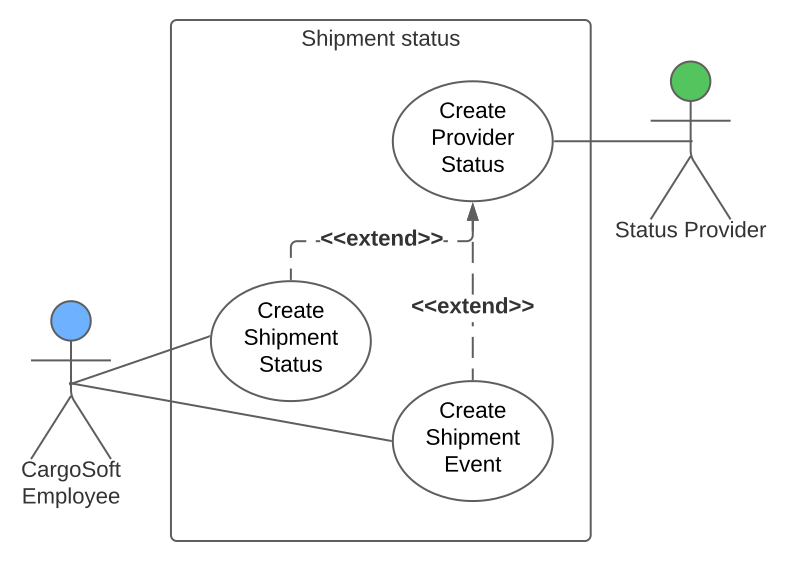
| Type | Origin and behavior | API availability |
|---|---|---|
| Shipment provider status | Supplied by an external status or service provider; codes depend on the provider | Creation through POST /cargosoft/status; no retrieval endpoint yet |
| Shipment status | Customer-defined and optionally mapped from provider status | No retrieval endpoint yet |
| Shipment event | CargoSoft-defined and optionally derived from shipment or provider status | Available through GET /cargosoft/shipment/{id}/events |
Shipment provider status
These status messages come from external status providers and service providers. CargoSoft employees cannot enter or change them manually. A provider status represents exactly one state, such as a planned, estimated, or actual date and time. Its code is defined by the provider and can therefore vary between providers.
Shipment status
CargoSoft customers define these status codes themselves. Provider statuses can be mapped to shipment statuses through the customer's basic data. For example, provider status ABC can be mapped to the customer-defined shipment status ETA; consequently, there is no universal list of valid shipment status codes.
A shipment status record can contain both planned and actual date information. Customers can add status information manually, but an existing record can no longer be changed.
Shipment events
Shipment events are fixed status events defined by CargoSoft. They can be retrieved when data is available for the shipment. An event can be created automatically from a shipment or provider status when the CargoSoft master data is configured accordingly. It represents either a planned or an actual instance and can be changed manually or by background processes. The complete list of event codes is documented by the GET /cargosoft/shipment/{id}/events endpoint.
Generating a shipment number requires three pieces of information: the shipment number definition (posdef), the main department, and the sub department. Each value can be configured individually on the EDI partner determined from the authenticated API user. A configured EDI partner value takes precedence; an empty or blank value is treated as not configured. Each key is resolved independently, and unrelated qualifiers on the EDI partner are ignored.
| Key | Meaning | Fallback if not configured or blank on the EDI partner |
|---|---|---|
SHIPMENT_NUMBER_DEFINITION_VERSION | Shipment number definition version to use | shipment_number_definition_version from the request body, if present; otherwise the CargoSoft client's default |
MAINDEPARTMENT | Main department used for shipment numbering | maindepartment from the request body; if neither value is present, the request is rejected |
SUBDEPARTMENT | Sub department used for shipment numbering | subdepartment from the request body; if neither value is present, the request is rejected |
ADDRESS_FORMAT | Address format used for shipment addresses | The CargoSoft client's default from the general company parameters |
Please note: If a request does not need to rely on the EDI partner's settings, for example during testing,
shipment_number_definition_version,maindepartment, andsubdepartmentcan be supplied directly in the request body.
An EDI code conversion translates an EDI partner's own code (for example for a charge type or packaging code) into the corresponding CargoSoft internal code, or vice versa, depending on direction. They are looked up with the lookup endpoint of the code conversion functional group, using a combination of the EDIPARTNER, DIRECTION, CODETYPE and SOURCECODE identifiers.
Two identifier combinations are served from a cache instead of querying the database on every request, since this master data changes very rarely:
EDIPARTNER+DIRECTION+CODETYPE: returns every code conversion configured for that EDI partner's table/direction.EDIPARTNER+DIRECTION+CODETYPE+SOURCECODE: returns the one specific conversion for that source code.
Omitting EDIPARTNER from a DIRECTION + CODETYPE + SOURCECODE lookup returns every matching conversion across all EDI partners that happen to share the same source code - also served from the cache. Any other identifier combination is looked up directly against the database.
Please note: the
DIRECTIONidentifier's value must be the raw single-character code as stored in the CargoSoft TMS (EorS), not thedirectionvalue (RECEIVE/SEND) shown on the response object.